If you want to build modern Android apps, learning Kotlin fundamentals isn’t optional anymore. It’s the baseline requirement.
Look, Android development used to be messy. We dealt with endless boilerplate code, verbose syntax, and constant crashes caused by the dreaded NullPointerException.
Then Kotlin arrived—and everything changed.
Whether you’re transitioning from Java or starting your programming journey from scratch, mastering core Kotlin fundamentals will make you a faster, more effective, and happier developer.
In this ultimate guide, you’ll discover:
- The Foundations: Why Kotlin took over Android and how it actually runs under the hood.
- Core Syntax & Variables: How to write clean, idiomatic code using
val,var, and smart type inference. - Null Safety Masterclass: How to eliminate null-pointer crashes forever using Kotlin’s built-in compile-time checks.
Let’s dive right in.
1. The Foundations of Kotlin
Before diving deep into the syntax, you need to understand why Kotlin exists in the first place—and why it quickly became the dominant language for modern Android engineering.
Back in 2011, JetBrains (the team behind IntelliJ IDEA) set out to build a language that could solve real-world development pain points. They didn’t want a purely theoretical language; they wanted a practical tool that was concise, safe, and fully compatible with existing Java codebases.
Fast forward to today: Kotlin isn’t just an alternative to Java. It is the gold standard for Android app development.

Why Google Went All-In on Kotlin
In 2017, Google made a historic announcement at Google I/O by declaring official support for Kotlin on Android. By 2019, they shifted to a Kotlin-first mindset.
Why the sudden shift?
- Massive Boilerplate Reduction: Tasks that required dozens of lines of verbose Java code (like creating Data Transfer Objects with getters, setters,
equals(), andhashCode()) take just one single line in Kotlin. - Better App Stability: Kotlin’s type system catches common software bugs—especially
NullPointerExceptionerrors—during compilation rather than letting them crash user devices in production. - Modern Language Features: Support for lambdas, extension functions, coroutines, and functional programming concepts makes writing complex mobile applications significantly easier.
💡 Deep Dive Articles
- What Is Kotlin? A Complete Beginner’s Guide — Get a comprehensive breakdown of Kotlin’s core design philosophy, ecosystem, and history.
- Why Kotlin Became the Official Android Programming Language — Explore the full story behind Google’s shift to Kotlin-first development and what it means for mobile engineers.
2. Kotlin vs. Java: The Developer’s Dilemma
If you’ve been in Android development for a while, you know Java was the undisputed king for decades.
So why did the entire industry shift toward Kotlin?
It comes down to a fundamental paradigm shift: developer velocity, code safety, and expressiveness.
The Paradigm Shift: Modern vs. Legacy
Java was designed in the 1990s.While it remains an enterprise powerhouse, it carries heavy historical baggage.
Kotlin was built specifically to eliminate Java’s pain points without breaking compatibility with existing Java codebases.
Here is a real-world example of what that means in practice:
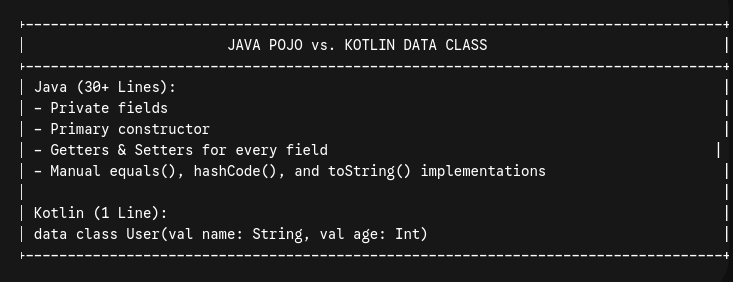
By cutting out hundreds of lines of repetitive code, Kotlin reduces surface area for bugs and speeds up code reviews dramatically.
Kotlin vs. Java: Feature Breakdown
Here is how Kotlin and Java compare across key mobile development metrics:
| Feature | Java | Kotlin | The Winner |
| Null Safety | Runtime checks (risk of NullPointerException) | Built into type system at compile time | 🏆 Kotlin |
| Boilerplate Code | Verbose (requires explicit getters, setters, casting) | Up to 40% less code for identical functionality | 🏆 Kotlin |
| Async Operations | Threads, Callbacks, CompletableFuture | Built-in lightweight Coroutines | 🏆 Kotlin |
| Extension Functions | Not supported (requires static utility classes) | Add new methods to existing classes without inheritance | 🏆 Kotlin |
| Ecosystem & Interop | Decades of mature tooling and enterprise adoption | 100% full bidirectional Java interoperability | 🤝 Tie |
Safety by Design vs. Runtime Risk
In Java, any object reference can hold null unless manually guarded. If you forget a single null check, your app crashes on user devices.
Kotlin flips this model on its head.
In Kotlin, types are non-nullable by default. If a variable needs to hold null, you must explicitly declare it with the ?operator.The compiler forces you to handle potential null values before your code ever compiles.
💡 Deep Dive Article
- Kotlin vs Java: Complete Comparison for Android Developers — Read our full head-to-head technical breakdown with side-by-side code examples and migration strategies.
3. Under the Hood: Compilation & Execution
One of the biggest misconceptions beginners have is that Kotlin requires a completely new virtual machine or runtime to run on Android devices.
It doesn’t.
Under the hood, Kotlin compiles down to standard Java bytecode. That means it runs seamlessly on the Java Virtual Machine (JVM) and Android’s runtime environment without any performance penalty.

How Kotlin Works with the JVM and Android
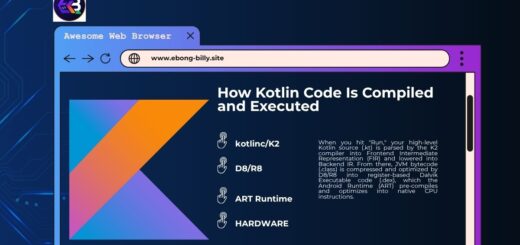
Here is the exact step-by-step lifecycle of your Kotlin code:
- Source Code: You write your application code inside
.ktfiles using clean, modern syntax. - Bytecode Generation: The Kotlin compiler (
kotlinc) processes your source files and emits standard.classfiles containing JVM bytecode. - Dexing for Android: For Android builds, tools like D8/R8 convert those standard JVM
.classfiles into.dex(Dalvik Executable) files. - Execution: The Android Runtime (ART) executes the optimized
.dexbytecode directly on the user’s mobile hardware.
Because the final product is standard bytecode, Android devices don’t even know whether a piece of code was originally written in Java or Kotlin!
100% Bidirectional Interoperability
Because Kotlin and Java both compile to standard JVM bytecode, they enjoy zero-friction interoperability.
- You can call existing Java libraries and framework APIs directly inside your Kotlin code.
- You can call Kotlin functions and classes from legacy Java files inside the same project.
- Migration doesn’t require a total rewrite—you can migrate your Android codebase one single file at a time.
This architectural design is precisely why enterprise teams were able to adopt Kotlin so rapidly without discarding years of existing Java infrastructure.
💡 Deep Dive Article
- How Kotlin Code Is Compiled and Executed — Want to see the exact bytecode generated by Kotlin? Check out our step-by-step breakdown of
kotlinc, bytecode inspection, and ART runtime performance.
4. Basic Kotlin Syntax & Core Building Blocks
Now that you understand how Kotlin operates under the hood, let’s look at the actual code.
If you are coming from languages like Java, C++, or C#, Kotlin’s syntax will feel instantly refreshingly clean. There are no mandatory semicolons, boilerplate class wrappers aren’t required for simple scripts, and top-level functions are supported natively.
Your First Kotlin Program
Every executable Kotlin application begins with an entry point function named main().
Here is the classic “Hello, World!” in modern Kotlin:
fun main() {
    println("Hello, Kotlin Fundamentals!")
}

Code language: Kotlin (kotlin)
Notice how minimalist this is compared to traditional languages:
funkeyword: Used to declare a function (short for function).- No enclosing class needed: Functions can exist at the top level of a file.
- No semicolons: Kotlin statements end automatically at the end of the line.
- Concise I/O:
println()wraps standard output cleanly without needingSystem.out.println().
Key Syntax Rules & Conventions
To write idiomatic Kotlin code, keep these core syntax principles in mind:
- Top-Level Declarations: You can declare variables, constants, and functions directly in a
.ktfile outside of any class context. - Type Inference: While Kotlin is statically typed, you rarely need to declare types manually. The compiler infers variable types based on assigned values.
- Expression-Based Syntax: In Kotlin, many constructs (like
ifstatements andwhenexpressions) return values directly, allowing for clean, single-line functions.
// Example of a single-expression function with type inference
fun multiply(a: Int, b: Int) = a * b

Code language: Kotlin (kotlin)
💡 Deep Dive Article
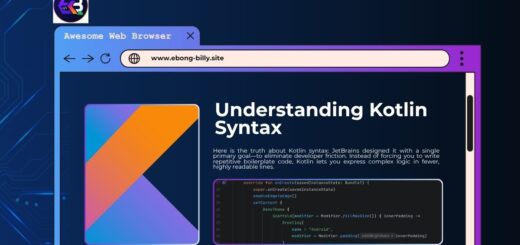
- Understanding Kotlin Syntax: A Practical Introduction — Master Kotlin’s foundational code structures, function signatures, top-level declarations, and coding style guidelines.
5. Variables & Data Types
Managing state cleanly is at the heart of robust Android app development.
In Kotlin, variable declarations prioritize safety and immutability right out of the gate.
Immutability First: val vs. var
Kotlin forces you to explicitly choose whether a variable can be modified after creation.

val appName = "MyAndroidApp" // Read-only
// appName = "NewApp"       // ❌ Compilation Error: Val cannot be reassigned

var userScore = 10           // Mutable
userScore = 15               // ✅ Works fine

Code language: Kotlin (kotlin)
Why You Should Prefer val by Default
In modern Android architecture (especially when working with state management and Jetpack Compose), mutability is a major source of bugs and race conditions.
By defaulting to val, you ensure your state remains predictable and thread-safe. Use varonly when state reassignment is strictly necessary.
Kotlin’s Unified Type System
Unlike Java—which separates primitive types (int, boolean) from object wrapper types (Integer, Boolean)—everything in Kotlin is treated as an object.

When compiled down to bytecode, the Kotlin compiler automatically optimizes these into raw Java primitives wherever possible to prevent memory overhead. You get the speed of primitives with the convenience of object method calls!
Core Data Types Overview
- Numbers:
Int,Long,Float,Double,Byte,Short - Booleans:
Boolean(trueorfalse) - Characters & Strings:
Char(single quote'A'),String(double quote"Hello") - Arrays:
IntArray,Array<String>, etc.
Type Inference in Action
You don’t need to explicitly declare variable types if the context is obvious:
val count = 42          // Compiler infers Int
val pi = 3.14159        // Compiler infers Double
val message = "Success" // Compiler infers String

Code language: Kotlin (kotlin)
If you do want to declare types explicitly, use colon notation:
val userId: Long = 100452L

Code language: Kotlin (kotlin)
💡 Deep Dive Articles
- Kotlin Variables Explained: var vs val — Dive deeper into variable re-assignment, memory allocation, and best practices for immutability in Android.
- Kotlin Data Types Explained — A complete technical guide to number representation, explicit type casting, String templates, and primitives under the hood.
6. Master Null Safety: Kotlin’s Ultimate Superpower
If you ask any mobile engineer what the most frustrating part of legacy Android development is, they will give you the same three-word answer:
NullPointerException (NPE).
British computer scientist Sir Tony Hoare—the creator of the null reference—famously called it his “billion-dollar mistake.” It has caused uncounted app crashes, lost revenues, and sleepless nights for developers worldwide.
Kotlin was engineered specifically to fix this flaw at the language level.

Non-Nullable vs. Nullable Types
In Kotlin, the type system explicitly differentiates between references that can hold null and those that cannot.
By default, variables cannot hold null:
var name: String = "Billy"
// name = null ❌ Compilation Error: Null can not be a value of a non-null type String

Code language: Kotlin (kotlin)
If your application logic genuinely requires a variable to hold null (such as an optional user field from a network API), you must explicitly append a question mark (?) to the type declaration:
var middleName: String? = "Ebong"
middleName = null // ✅ Works perfectly

Code language: Kotlin (kotlin)
Essential Operators for Null Handling
Because the compiler knows when a variable is nullable, it prevents you from calling methods on it directly without handling the potential null state first.
Kotlin provides four essential tools to deal with nullable values cleanly:
1. Safe Call Operator (?.)
Executes the call only if the target is not null. If it is null, the entire expression safely evaluates to null without throwing a crash.
val length: Int? = middleName?.length

Code language: Kotlin (kotlin)
2. Elvis Operator (?:)
Provides a default fallback value if an expression evaluates to null. (Tip: Turn your head sideways—the symbol looks like Elvis Presley’s hair and eyes!)
// If middleName is null, default to 0
val safeLength: Int = middleName?.length ?: 0

Code language: Kotlin (kotlin)
3. Not-Null Assertion Operator (!!)
Forcibly converts any nullable value into a non-nullable type. Use this with extreme caution! If the variable happens to be null at runtime, it will trigger an immediate NullPointerException.
// Only use this if you are 100% certain the value cannot be null here
val forcedLength = middleName!!.length

Code language: Kotlin (kotlin)
4. Scope Functions for Null Check (.let {})
To execute a block of code only when an object is non-null, combine the safe call operator with .let:
middleName?.let { name ->
    println("User's middle name is $name")
}

Code language: Kotlin (kotlin)
Smart Casts: Compiler Intelligence in Action
In many programming languages, after checking whether an object is null or of a specific type, you have to explicitly cast it before calling its methods.
Kotlin eliminates this redundancy through Smart Casts.
Once the compiler verifies that a variable is not null inside a conditional block, it automatically casts it to its non-nullable form:
fun printUsername(name: String?) {
    if (name == null) {
        println("Guest user")
        return
    }

    // Inside this block, Kotlin automatically smart-casts 'name' from String? to String!
    println("User length: ${name.length}") // No ?. or !! needed!
}

Code language: Kotlin (kotlin)
Smart casts also work seamlessly with type checks using the is keyword:
fun processData(obj: Any) {
    if (obj is String) {
        // 'obj' is automatically smart-cast to String here
        println(obj.uppercase())
    }
}

Code language: Kotlin (kotlin)
💡 Deep Dive Articles
- Understanding Null Safety in Kotlin — Master the fundamental concepts of compile-time null checking and type system rules.
- Kotlin Nullable Types: ?, !!, and let Explained — A practical guide on when to use each null-handling operator in production Android applications.
- Kotlin Smart Casts Explained With Examples — Deepen your understanding of how the Kotlin compiler tracks control flow to automate safe casting.
7. Conclusion & Next Steps
Mastering Kotlin fundamentals is the single highest-leverage investment you can make in your modern Android development journey.
By ditching Java’s verbose boilerplate and taking advantage of Kotlin’s compile-time null safety, type inference, and expressive syntax, you write code that is cleaner, easier to maintain, and significantly less prone to production crashes.
What We Covered in This Ultimate Guide
Here is a quick recap of the foundational pillars we explored:
- The Foundations: Why Google shifted to a Kotlin-first paradigm and how JetBrains engineered a 100% interoperable, modern language.
- Kotlin vs. Java: How Kotlin slashes boilerplate by up to 40% while preserving seamless compatibility with legacy JVM infrastructure.
- Compilation & Execution: How
kotlinccompiles your.ktsource files into standard bytecode executed efficiently by the Android Runtime (ART). - Core Syntax & Variables: Writing clean, idiomatic code using top-level declarations and preferring immutable
valover mutablevar. - Null Safety Superpower: Using safe calls (
?.), Elvis operators (?:), scope functions (.let), and smart casts to eliminateNullPointerExceptioncrashes for good.
Where to Go From Here
Now that you have a solid grasp of the core fundamentals, it’s time to move beyond the basics and start building robust, scalable mobile applications.
Here is your recommended roadmap for what to learn next:
- Object-Oriented & Functional Programming in Kotlin: Dive into custom classes, interfaces, abstract classes, sealed classes, extensions, and higher-order functions.
- Kotlin Coroutines: Master lightweight concurrency to handle asynchronous network requests and database operations cleanly without thread blocking.
- Jetpack Compose: Build modern, declarative Android UIs entirely in Kotlin, completely replacing legacy XML layouts.